News
Companial, Ciellos and Simplanova go further as one.
For years we have worked alongside you as three companies with one shared purpose: helping Microsoft Dynamics partners grow.
Discover new CompanialTuesday, March 18, 2025

Reading time: 6 minutes
In the world of Dynamics 365 Business Central, licensing can often be a complex topic. Recently, a partner reached out with a question about the specifics of Business Central Team Member licenses, particularly regarding the customization limits mentioned in the Dynamics 365 Licensing Guide. This blog post aims to clarify how Team Member licenses work in Business Central, including practical insights and considerations for partners.
To provide a practical perspective, I conducted a test in a paid environment with a Team Member license. In this test, I created 20 custom tables in an extension and performed various operations on them, including creating, reading, modifying, and deleting records. Interestingly, there was no mechanism in place to stop me from editing more than 15 custom tables. This suggests that, at present, Microsoft does not seem to enforce this rule through the software.
Below is a picture of one of the MANY different iterations of code tests that I performed, just in case any developers are reading through this.
However, partners should exercise caution. If Microsoft decides to implement a mechanism to enforce this rule in the future, customers could face disruptions if they exceed the 15-table limit. It’s essential to adhere to the guidelines to avoid potential issues during or after upgrades. (The thinking with that statement is… If Microsoft enforces this in a new version, after you have upgraded all of a sudden your customers will not be able to do what they did in the past.
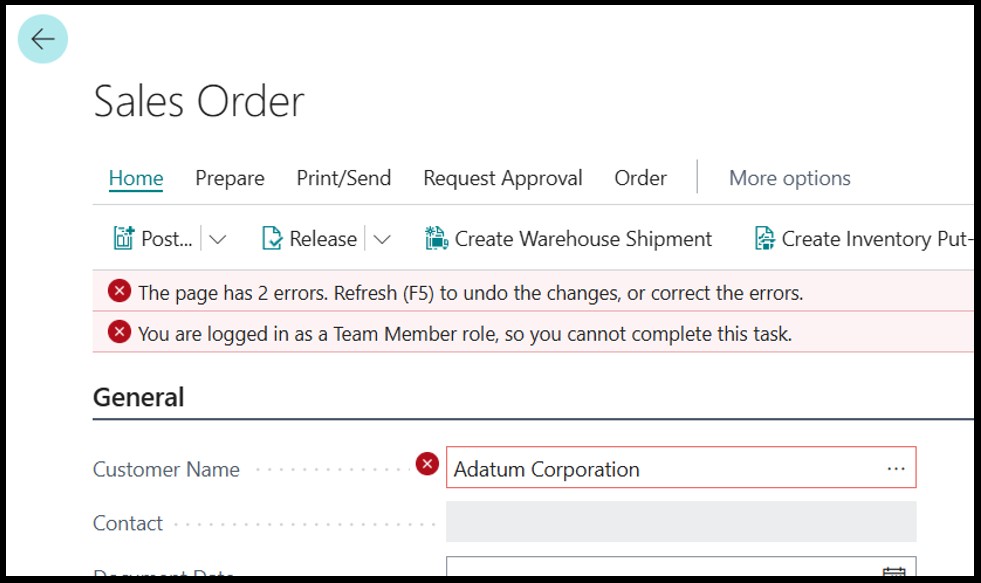
While Team Member licenses allow users to create, edit, and delete sales quotes without any issues, they do not permit the creation of sales orders. If a user with a Team Member license attempts to create a sales order, they will encounter an error message stating: “You are logged in as a Team Member role, so you cannot complete this task.” This limitation is important to keep in mind when planning user roles and permissions. The list provided above is what a Team Member license can do, any other action you attempt to do in the system will be met with error messages.
Table Extensions: The 15-table limit applies to custom tables and standard Dataverse tables. It does not count towards base tables in the system or table extensions. Table extensions work with the base table and are considered part of the base table. Therefore, the rights you have on the base table extend to your table extensions.
Compliance: While the current system may not enforce the 15-table limit, it’s crucial to comply with the licensing guidelines to ensure smooth operations and avoid future complications.
Follow usage guidelines: Have a proper read through the list of actions that a Team member license can perform, as you will not be able to perform any actions outside of the list provided in the licensing guide, and at the top of this BLOG post.
No posts found!
News
For years we have worked alongside you as three companies with one shared purpose: helping Microsoft Dynamics partners grow.
Discover new Companial ↗