


This release is driven by feedback from our Partner community and brings a range of improvements and new features.
Lire la suiteUpgrading to a Preview Environment in Business Central 26.5 – Why You Should Care
Monday, September 15, 2025
Reading time: 5 minutes
Microsoft released version 26.5 of Business Central, and with it came a small but powerful change that many of us have been waiting for: you can now upgrade a sandbox environment to a preview version.
Yes, you read that right. No more creating demo preview environments with demo data just to test your extensions. Now you can take a copy of your production environment, convert it into a sandbox, and upgrade that sandbox to the preview of version 27. This means you can test your extensions with your own data, in a real-world context, before the major release hits.
Let’s break it down
Why This Matters
Previously, preview environments were isolated. You could only create a new environment with demo data, which made it hard to test compatibility with your actual extensions and configurations. Now, with this upgrade path:
- You can check extension compatibility with the upcoming release.
- You can test new features using your real data.
- You can prepare for the upgrade with confidence.
Important Rules to Remember
Even though you can now upgrade to a preview, all the usual preview rules still apply:
- You can only upgrade to a preview 30 days before the release of a major version.
- Preview environments expire 30 days after the major version is released.
- There is no upgrade path from a preview to GA (General Availability).
- Once upgraded, the environment will be automatically deleted 30 days after the major version release.
So if you upgrade to the preview of version 27 now in September, expect that environment to be deleted at the end of October.
How to Upgrade to the Preview
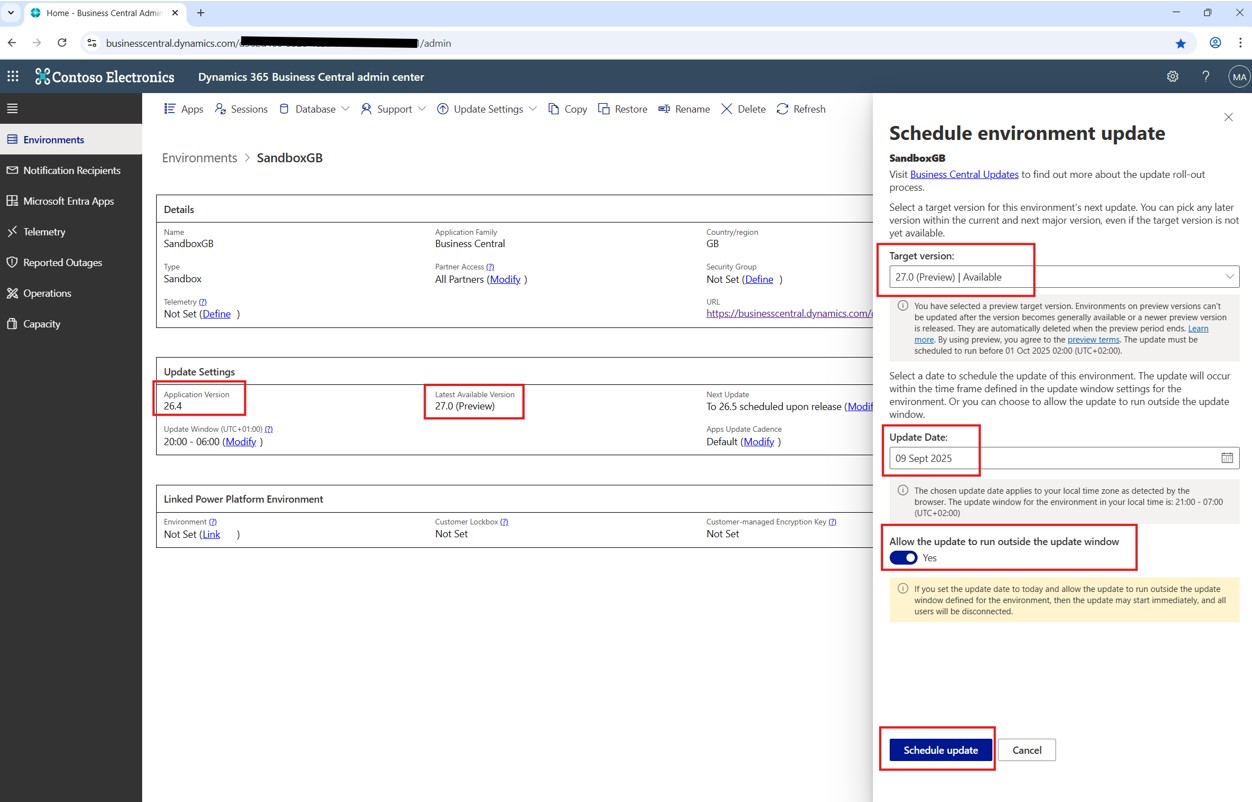
Here’s a step-by-step guide to upgrading your sandbox to the preview version:
- Go to the Business Central Admin Centre.
- Copy your production environment into a sandbox.
● Only sandbox environments can be upgraded to preview.
● Production environments cannot be upgraded to preview. - Open the sandbox environment.
● You’ll see your current version (e.g. 26.4) and the available preview (version 27). - Navigate to Update Settings and click Set Update Date.
- In the Schedule environment update window, select 27 Preview as the target version.
- Confirm the Warning.
● A warning will appear letting you know this is a preview version. It will remind you that the environment will be deleted after the release. - Choose today’s date in the update date
- Toggle “Allow the update to run outside the update window” to Yes.
● This will kick off the upgrade immediately. (When selecting todays date and Allow update to run outside of the update window is set to yes.)
● Off course you can schedule this to run at night as with any other regular update, just schedule it as you normally would. - Schedule the Update.
● Make Sure No One Is Connected. Anyone connected to the sandbox will be kicked out.
Using the Admin Centre API
If you manage environments programmatically using the Business Central Admin Centre API, there’s good news. A new property called targetVersionType has been added. It allows you to specify whether the target version is GA or Preview.
Learn more here:
For more details about the API here is a link to learn more.
For more details about the targetVersionType property, and how to use it, use the following link.
Final Thoughts
This is a game-changer for partners, developers, and customers alike. Being able to test your extensions and data in a preview environment means fewer surprises when the major version drops. It’s a smoother, smarter way to prepare.
Meet Berny Düring, our Partner Technology Strategist for Business Central at Companial. With over 27 years of experience as a Microsoft Certified Trainer, he brings a wealth of expertise and knowledge to his role. Starting as a Product Manager at Navision South Africa and subsequently at Microsoft, he later established his own successful partner. Joining Companial as a franchisee in the Middle East-African market, Berny once again played a crucial role in guiding partners to grow and develop their Business Central practices through mentoring and training. He holds qualifications in Business Management, Taxation, Law, Supply Chain Management, and Computer Sciences.

- Upgrading to a Preview Environment in Business Central 26.5 – Why You Should Care - 15/09/2025
- What’s New in Microsoft Dynamics 365 Business Central 2025 Release Wave 2 – eCommerce and Electronic Documents - 03/09/2025
- What’s New in Microsoft Dynamics 365 Business Central 2025 Release Wave 2 – Finance and Governance - 01/09/2025
En savoir plus sur Business Central
WAIR
WAIR strongly recommends Companial’s ISV Partnership Program to other ISVs looking to grow.
Lire la suiteWhat’s New in Microsoft Dynamics 365 Business Central 2025 Release Wave 2 – eCommerce and Electronic Documents
Over the past month, Microsoft has been releasing documentation highlighting what’s new and planned for Microsoft Dynamics 365 Business Central ...
Lire la suiteIndustry-focused GTM A Guide for Microsoft Dynamics 365 Business Central Partners
Your ultimate guide to crafting high-converting go-to-market strategies tailored to four high-potential industries
Lire la suiteWhat’s New in Microsoft Dynamics 365 Business Central 2025 Release Wave 2 – Finance and Governance
We’ll dive into the latest updates focused on Financial Management and Governance & Administration.
Lire la suiteWhat’s New in Microsoft Dynamics 365 Business Central 2025 Release Wave 2 – Country and Development Changes
In our first blog, we explored the exciting advancements in CoPilot and Agent capabilities. Today, we shift our focus to ...
Lire la suite