Se implementata correttamente, l'integrazione Dual-Write rivoluziona il modo in cui le organizzazioni orientate ai progetti gestiscono ogni aspetto, dalla pianificazione ...
Per saperne di piùHow to Remove Admin Relationships Granted to Partners
Tuesday, July 15, 2025
Reading time: 7 minutes
In today’s dynamic business environment, managing your admin relationships efficiently is key to maintaining security and operational fluidity. If you’ve granted admin rights to partners and need to remove them, either to update permissions or for strategic reasons, here’s a straightforward guide to help you reclaim control and optimize your processes. In the example below I have granted “Global Admin” permission to a company, and now I want to remove the specific GDAP permission. (GDAP = Granular Delegated Admin Privileges)
GDAP is a great way for Dynamics partners to manage and administer their customer systems without requiring a license to do so… If we did not have the GDAP access, the only other way a partner would be able to access the customer’s system is by creating a user, and purchasing a license for that user, whcih may turn out to be costly for smaller customers.
Why Removing Admin Relationships Matters
Admin relationships often involve sensitive data, access to organizational settings, and the ability to make critical changes. While trusted partnerships are essential, there may come a time when reviewing or revoking admin permissions becomes necessary due to:
- Changes in the partnership agreement
- Security concerns or compliance requirements
- Restructuring or streamlining access
Removing admin relationships ensures your organization remains agile and secure, while aligning permissions with current business needs.
Steps to Remove Admin Relationships
Follow these steps to efficiently remove admin relationships granted to partners:
Step 1: Identify Current Admin Relationships
Start by reviewing your system to identify all existing admin relationships by logging on to Microsoft 365 admin center.
Step 2: Communicate Changes
Transparency is critical. Inform the affected partners ahead of time about the changes and explain the rationale. This strengthens professional trust and avoids misunderstanding.
Step 3: Revoke Admin Access
From the window where you logged onto the Microsoft 365 Admin Center, click on the relationship that you would like to modify:
Details of the relationship will be displayed, now click on the Roles tab to open details about the Roles that has been granted.
Once you can see the details about the Roles, you can click on the Remove Roles button to remove roles that you no longer want to grant to the partner.
A screen will pop up to confirm that you would like to remove access, to confirm, simply click on “Remove Roles” again.
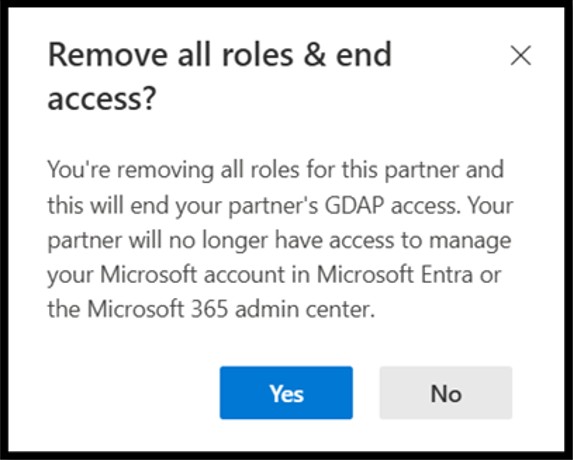
Once again you will be asked to confirm the removal of the GDAP access, as this is not a reversable change, and your partner will no longer be able to administer your system after the change.
You should lastly see a confirmation screen that the admin roles have been removed. After which you should no longer see the admin relationship in the list of GDAP partner access.
Best Practices for Future Admin Management
To prevent unnecessary complications down the line, consider adopting these best practices:
- Regularly audit admin access to ensure permissions align with current needs.
- Clearly define roles and responsibilities for admin users.
- Leverage tools to manage access securely and efficiently.
- Do not grant Global Admin rights to partners. Instead, consider granting specific roles that do not give them access to your entire system.
Conclusion
Removing admin relationships granted to partners is more than a technical task—it’s an opportunity to refine your organizational security and foster trust. By following a clear process and adhering to best practices, you create a foundation for stronger, more secure collaborations.
Meet Berny Düring, our Partner Technology Strategist for Business Central at Companial. With over 27 years of experience as a Microsoft Certified Trainer, he brings a wealth of expertise and knowledge to his role. Starting as a Product Manager at Navision South Africa and subsequently at Microsoft, he later established his own successful partner. Joining Companial as a franchisee in the Middle East-African market, Berny once again played a crucial role in guiding partners to grow and develop their Business Central practices through mentoring and training. He holds qualifications in Business Management, Taxation, Law, Supply Chain Management, and Computer Sciences.
- Conversational ERP: Why 2026 Is the Year We Stop Clicking and Start Talking to Our ERP - 05/02/2026
- Upgrading to a Preview Environment in Business Central 26.5 – Why You Should Care - 15/09/2025
- What’s New in Microsoft Dynamics 365 Business Central 2025 Release Wave 2 – eCommerce and Electronic Documents - 03/09/2025
Altri post del blog
The EU AI Act and the necessity of formulating an internal AI policy
La legge europea sull'IA modifica silenziosamente le regole per l'adozione dell'intelligenza artificiale in Europa. Non rallentando l'innovazione, ma ridefinendo le ...
Per saperne di piùEU AI Act Deadline of August 2nd
Preparatevi a questa tappa fondamentale per la conformità. Promuovete la cultura dell'IA in tutti i team con un punto di ...
Per saperne di piùDynamics partner GTM playbook: a simple framework into repeatable GTM wins
Esplora il framework Go-to-Market progettato e testato durante il Bootcamp di Marketing per i Partner Aziendali del 19 marzo 2026, ...
Per saperne di piùStop burning your best resources on unqualified leads
Scopri come GYDE365 Qualify aiuta i partner Microsoft Dynamics a generare lead più qualificati grazie a preventivi ERP rapidi e ...
Per saperne di piùWhere we take the Companial partner experience next
I risultati principali della ricerca di quest'anno e le aree prioritarie che i vostri feedback ci hanno aiutato a definire, ...
Per saperne di più