This release is driven by feedback from our Partner community and brings a range of improvements and new features.
Leer másHow to write code with Enum and Interface in Business Central
Thursday, May 21, 2020
Reading time: 5 minutes
With the Microsoft Dynamics 365 Business Central 2019 wave 2 release, Microsoft made available a new data type – Enumeration (Enum).
Enum is a list that consists of a set of named constants. It can be used as table fields, local and global variables, and parameters.
Enum replaces the old Option data type and from now on, during development, instead of creating a new Option we have to create a new Enum. In addition, if you want to transition the solution from C/AL to AL, it is recommended to replace Option with Enum. Enums are more readable, reusable, and extendable compared to the Options data type.
How to define a new Enum
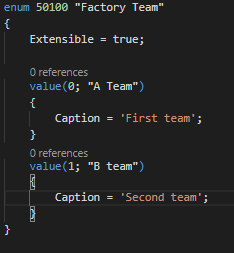
To define a new Enum, you have to create a new .al file in which you define the Enum as an object, and specify an ID and a name. In this object you list the values (each value is declared with a unique ID and a value, and you can add a caption for the value) of the Enum as follows:
Enums are pure metadata and can’t contain any kind of code.
After creating Enum, you might want to add additional values depending on changing business needs.
How to add additional values to the existing Enum
If you want to add one or more new values, you can just extend the existing Enum and you don’t need to find all the places where it is used that implement newly created values anymore. Of course, you can add more values to the original Enumeration list of values only if Enum is extensible (the extensible property is set to true). Extensible means that the Enum can be extended only in Extensions. Otherwise, you’ll get an error as shown in the screenshot below:
How to replace Option with Enum
Microsoft intends to replace all Options with Enums in future releases. With the Microsoft Dynamics 365 Business Central 2020 wave 1 release, Microsoft has already added about 125 new Enums. That is why it is recommended to replace Options with Enums in your solutions as well. But before creating a new Enum, it is worth checking if it hasn’t already been created by Microsoft.
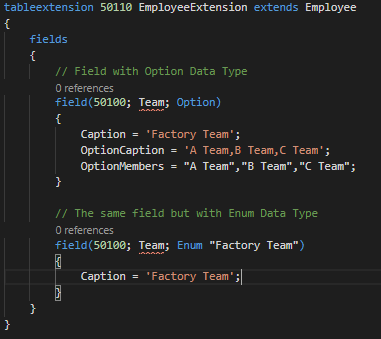
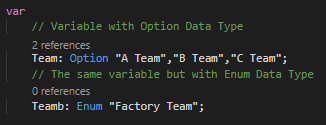
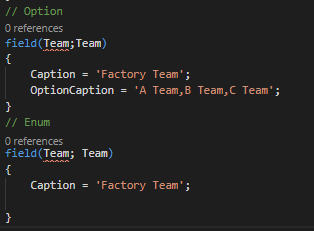
In the following screenshots, you can see how to change Option to Enum.
How to implement warnings when creating a new Enum
Quite often you have to use Option as Integer, but conversion to and from Enum is stricter than for Options in C/SIDE. Therefore, not all places can be replaced exactly the same as with Option because warnings are received. Below are a few examples and tips on how to implement warnings:
- Record.TestField(Enum, Record.Enum::Value) Example – Employee.TestField(Team, Employee.Team::”A Team”); -> Employee.TestField(Team, Employee.Team::”A Team”.AsInteger());
- Record.Option := Record.Enum Example- ItemChargeAssgntSales.”Applies-to Doc. Type” := SalesLine.”Document Type”; -> ItemChargeAssgntSales.”Applies-to Doc. Type” := SalesLine.”Document Type”.AsInteger();
- Record.Enum > Record.Enum::Value Example – Employee.Team > Employee.Team::”A Team” -> Employee.Team.AsInteger() > Employee.Team::”A Team”.AsInteger()
- Record.Enum := Record2.Enum – 1 (1 – can be integer, decimal or even option) Example – Employee.Team := Employee2.Team – 1 -> Employee.Team := “Factory Team”.FromInteger(Employee2.Team.AsInteger() – 1);
Frequently, it is enough to add .AsInteger() to the end of the Enum to deal with the warnings.
Apart from Enum, with the Business Central 2020 wave 1 release, Microsoft made Interfaces available. An Interface in AL is a syntactical contract that can be implemented by a non-abstract method.
What is Interface used for?
Interface is like a template that defines methods that have to be used by the functionality. It is used when you want to decide which capabilities need to be available for an object, while allowing actual implementations to differ. This allows for writing code that reduces the dependency on implementation details, makes it easier to reuse code, and supports a polymorphing way of calling object methods, which can be used for substituting business logic.
How to create and implement Interface
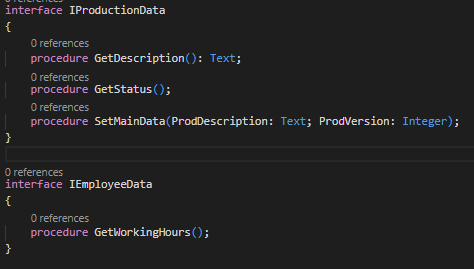
In the example below, you can see two new Interfaces created.
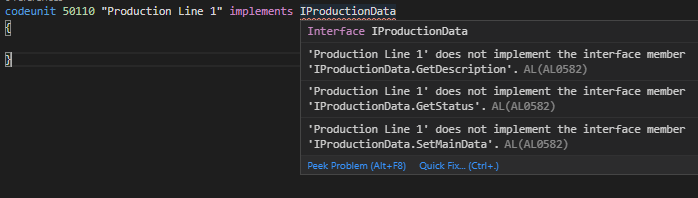
A new Interface object just declares the Interface name and methods (only name, parameters, return type, and visibility) without any code. All the necessary code must be described in one or more Codeunits that implement Interface. When you are implementing Interface in Codeunit, all methods must be defined, otherwise you’ll get an error.
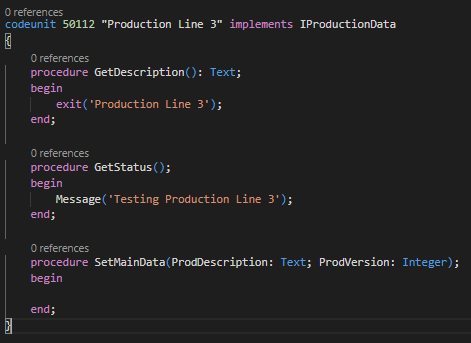
The Interface can be implemented by many different Codeunits with each having a different realization, but one Codeunit can also implement multiple Interfaces using comma separation.
As you can see, both Codeunits implement related methods differently.
How to use Interface implementation and how will it empower extendable Enums
In the screenshot below you can see how Interface enables a polymorphing way of calling object methods.
This example is not the best because you can figure out the extendable Enum issue which existed before Interface. Just imagine what happens if we extend Enum and add a value “C Team”. Method GetEmployeeProdDescription will return an empty value. But it can be fixed by defining which Interface the Enum values need to implement. To start with, we will create one more Codeunit to implement the new value of Enum.
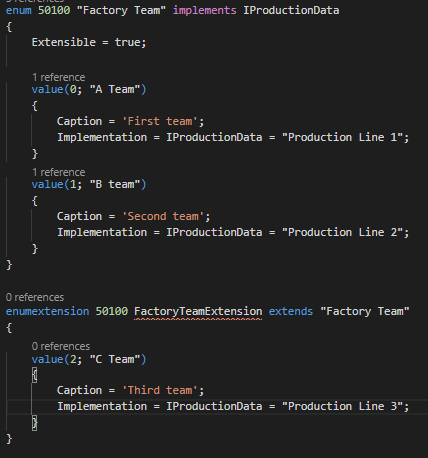
In the next step, we will extend Enum and for each value define which Interface to implement.
As you can see, you don’t need to additionally implement Interface for Enum extension because it is already done from the original Enum. Finally, we will replace a Case statement.
The examples above illustrate that Interface implementation can be easily done.
Searching for more development tips and tricks? Visit our Technical NAV/BC blog category!
Interface is a new Business Central 2020 wave 1 release feature with which you can create much more complex solutions with fewer code lines, requiring less effort to write them. C# and other programming languages have contained Enum and Interface for many years now. Many programmers who are familiar with those languages take advantage of its benefits. Introducing Enum and Interface to Business Central is great news for Business Central developers, who now can also reap the benefits of it.
Más información sobre Business Central
Upgrading to a Preview Environment in Business Central 26.5 – Why You Should Care
Microsoft released version 26.5 of Business Central, and with it came a small but powerful change that many of us ...
Leer másWhat’s New in Microsoft Dynamics 365 Business Central 2025 Release Wave 2 – eCommerce and Electronic Documents
Over the past month, Microsoft has been releasing documentation highlighting what’s new and planned for Microsoft Dynamics 365 Business Central ...
Leer másIndustry-focused GTM A Guide for Microsoft Dynamics 365 Business Central Partners
Your ultimate guide to crafting high-converting go-to-market strategies tailored to four high-potential industries
Leer másWhat’s New in Microsoft Dynamics 365 Business Central 2025 Release Wave 2 – Finance and Governance
We’ll dive into the latest updates focused on Financial Management and Governance & Administration.
Leer más